
Regions
Edit on GitHubZenoh regions
Zenoh version 1.9.0 introduces a new feature that allows subdividing a system into regions in a more flexible manner than before. This provides more scalability and allows deployments and topologies that were not possible before.
Please refer to deployment documentation regions section on how to deploy and configure Zenoh regions.
New possible topologies
Here are examples of topologies that were not possible to deploy before and are now available.
South regions interconnected as clients
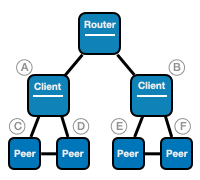
Example of configuragtion for nodes A and B:
{
  mode: "client",
  listen: {
    endpoints: ["tcp/[::]:0"]
  },
  connect: {
    endpoints: ["tcp/router_ip:7447"]
  },
  gateway: {
    south: [
      {
        filters: [
          {
            modes: ["client", "peer"]
          }
        ]
      }
    ]
  }
}
Example of configuragtion for nodes C, D, E and F:
{
  mode: "peer"
}
South regions interconnected in peer to peer
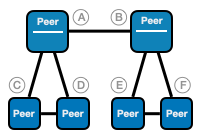
Example of configuragtion for nodes A and B:
{
  mode: "peer",
  region_name: "main",
  gateway: {
    south: [
      {
        filters: [
          {
            negated: true,
            region_names: ["main"]
          }
        ]
      }
    ]
  }
}
Example of configuragtion for nodes C, D, E and F:
{
  mode: "peer"
}
Migration
Most scenarios and topologies will continue working without any change when migrating from Zenoh version 1.8.x to 1.9.0. But:
- Some configuration option defaults have been changed.
- Some features and configuration options have been removed or changed in Zenoh v1.9.0.
Changed defaults
| Option | Previous default | New default |
|---|---|---|
connect.timeout_ms | { router: -1, peer: -1, client: 0 } | -1 |
connect.exit_on_failure | { router: false, peer: false, client: true } | false |
scouting.timeout | 3000 | -1 |
scouting.multicast.listen | { router: true, peer: true, client: false } | true |
scouting.multicast.autoconnect | { router: [], peer: ["router", "peer"], client: ["router"] } | { router: [], peer: ["router", "peer", "client"], client: ["router", "peer", "client"] } |
scouting.gossip.autoconnect | { router: [], peer: ["router", "peer"], client: ["router"] } | { router: [], peer: ["router", "peer", "client"], client: ["router", "peer", "client"] } |
Removed options
Here is a list of configuration options that have been removed in Zenoh v1.9.0 and instructions on how to change the Zenoh configuration to deploy similar scenarios with Zenoh v1.9.0.
peers_failover_brokering option
The peer failover brokering feature in routers has been removed and the corresponding option routing/router/peers_failover_brokering is no longer available in the configuration. This feature allowed the following kind of topology:
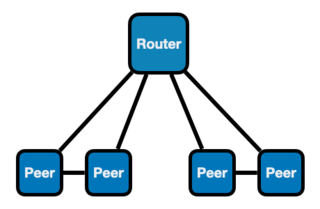
This kind of deployment will not work any more out of the box.
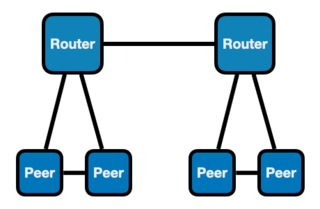
Here are 2 ways to workaround this change:
Deploy one gateway per subregion
Examples:
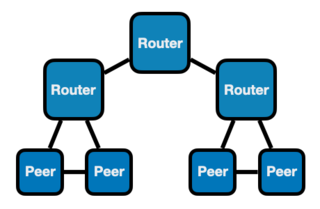
Configure multiple south regions on the gateway
If you really need a single gateway to serve two or more subregions of peers, you can configure multiple south regions on the gateway.
Example using region names:
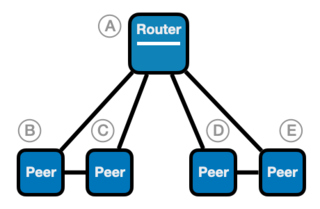
On gateway A:
{
  gateway: {
    south: [
      {
        filters: [
          {
            region_names: ["region_1"]
          }
        ]
      },
      {
        filters: [
          {
            region_names: ["region_2"]
          }
        ]
      }
    ]
  }
}
On peers B and C:
{
  region_name: "region_1"
}
On peers D and E:
{
  region_name: "region_2"
}
routing/peer options
The routing/peer section of Zenoh configuration has been removed. Zenoh peers can now only operate peer-to-peer in a clique topology. The router mode should now be used to deploy subsystems of applications in a mesh topology.
For example, the following deployment is now no longer possible as is:
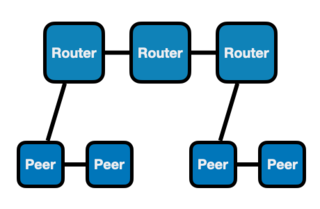
Such a scenario should be achieved by deploying all nodes in router mode and by configuring the gateway section of the 2 nodes of the upper layer that serve the subsystems:
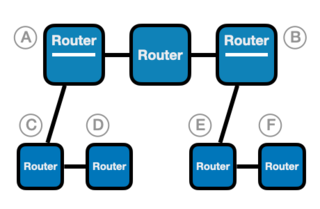
Example of configuration using region names:
On gateway A:
{
  mode: "router",
  gateway: {
    south: [
      {
        filters: [
          {
            region_names: ["region_1"]
          }
        ]
      }
    ]
  }
}
On gateway B:
{
  mode: "router",
  gateway: {
    south: [
      {
        filters: [
          {
            region_names: ["region_2"]
          }
        ]
      }
    ]
  }
}
On nodes C and D:
{
  mode: "router",
  region_name: "region_1"
}
On nodes E and F:
{
  mode: "router",
  region_name: "region_2"
}